Exporting to Anki
Mekuru supports two ways to move saved vocabulary into Anki.
CSV Export
Export your saved words as an Anki-friendly CSV file. The export includes:
| Column | Content |
|---|---|
| Word | Saved expression |
| Reading | Saved reading |
| Meaning | Joined dictionary definitions |
| Furigana | Anki-formatted furigana markup generated from the saved word and reading |
| Context | The saved sentence context |
To export:
- Open the Vocabulary tab.
- Tap the Export CSV icon to enter selection mode.
- Select the entries you want, or use Select all.
- Tap the export icon again to export the selected entries.
- Choose a save location in the file-save dialog.
The generated CSV can be imported into Anki on desktop or mobile.
AnkiDroid Direct Integration
Android only - This feature requires the AnkiDroid app.
Mekuru can send cards directly to AnkiDroid from dictionary lookup cards.
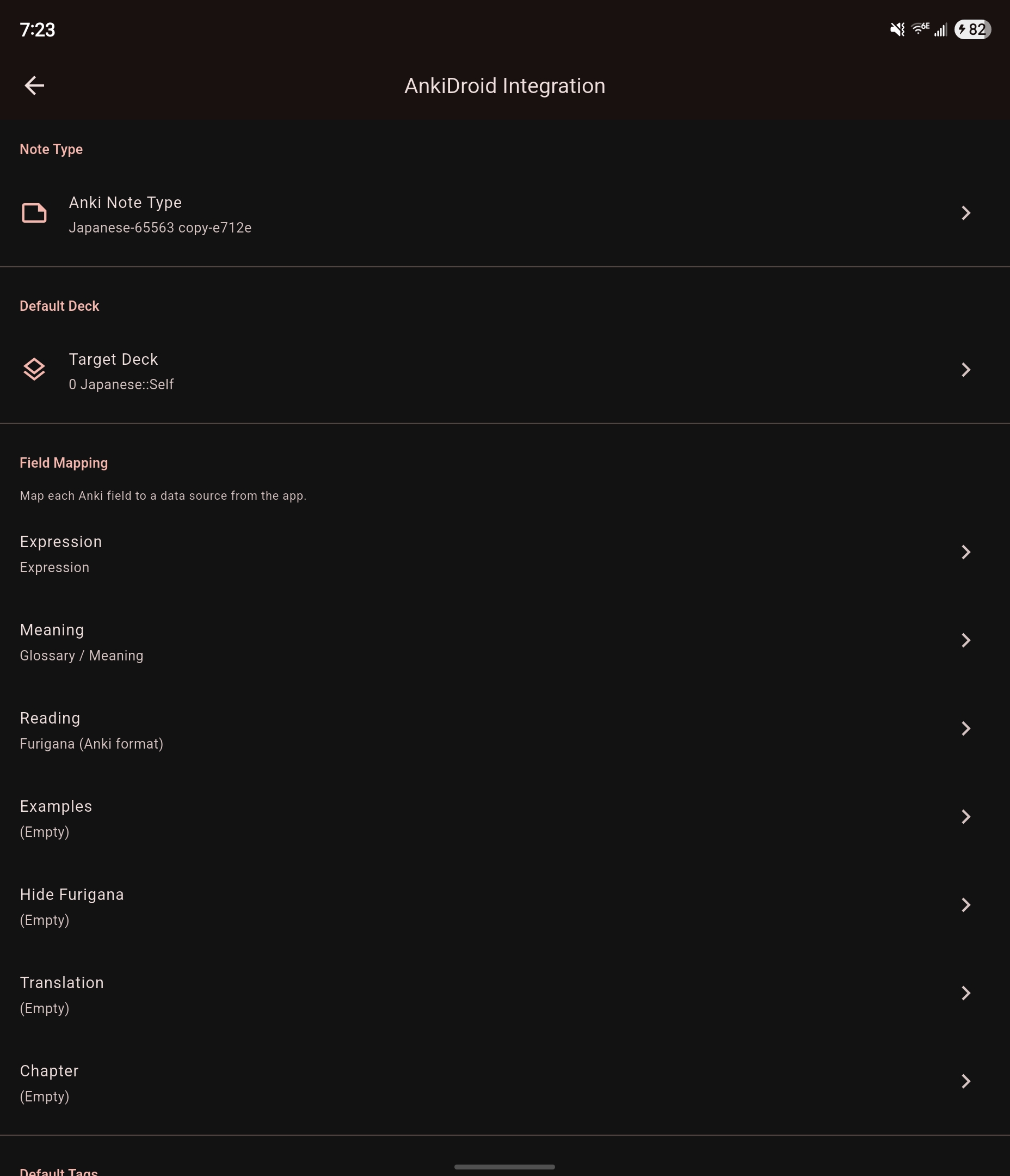
Setup
- Go to Settings > AnkiDroid Integration.
- Select the target deck.
- Select the note type.
- Map Mekuru's fields to the note type's fields.
- Optionally set tags to apply to created cards.
Sending Cards
Once configured, a send-to-AnkiDroid action appears on dictionary lookup cards. Tap it to create a card immediately.